Exsys Corvid v5.3:
New Manual and Trace Features
Exsys Corvid® v5.3 includes a completely rewritten manual that makes it easier than ever to get started with Corvid and use even the most complex features. A new enhanced Trace capability allows examining the status of variables, rules, Logic Blocks and the goal stack during a run, along with providing a detailed history of the session.
New Manual
The new Corvid Manual is a complete rewrite of the entire manual. The previous manual had been evolving over the past 11 years, but due to updates and changes in the program, was not always organized in the best way. To remedy this, the entire manual has been rewritten and restructured to reflect many years of teaching Corvid and helping developers understand how to use its many features.
The new manual makes it far easier to develop systems with Corvid. Chapters now not only explain the Corvid controls, but provide step by step instructions on implementing the functionality often used by most developers. Any areas where we have found developers typically having problems or getting confused are explained in particular detail.
The manual is also structured to make it easier for new developers. It is designed so that beginning chapters explain the fundamentals that all developers should know, without trying to explain advanced functions. These advanced functions, while very useful later, may be confusing to beginning users. Later chapters cover advanced functions in a way that makes it easier to use them and actually implement advanced features in a system.
Context sensitive "Help" buttons on virtually all screens take the user to the associated section of the manual.
New Trace Applet
The new Trace Applet has 4 tabs at the top that allow examining various information about the session. In addition the bottom of the window always displays the current Command Block command and current Logic Block line being executed.
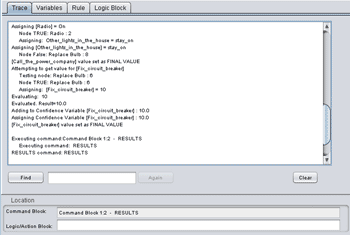 The Trace tab displays a history of the session. This is the same trace data as was displayed in earlier versions of Corvid (ver 5.2 and before), and which is displayed when trace is used with the Servlet Runtime or console window.
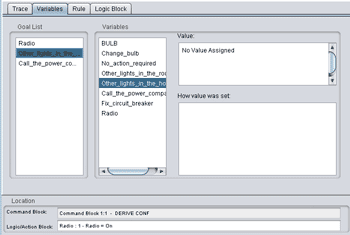 The Variables Tab allows examining the value of any variable in the system. The Goal List is displayed on the left side of the window for backward chaining systems and shows the order of the Goal variables being used for the immediate backward chaining. This detailed information has never been easily available to Corvid developers and makes understanding complex backward chaining systems much easier.
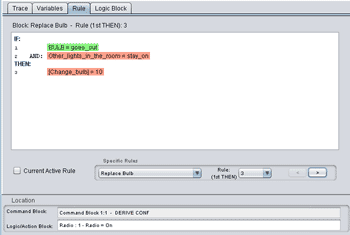 The Rules tab displays the current status of any rule in the system with the conditions color coded to indicate if the they are True, False or Unknown.
If the "Current Active Rule" check box is selected, the Rule tab will always display the rule that is currently being tested (IF condition) or used to make assignments (THEN condition). This rule will change dynamically as the system runs.
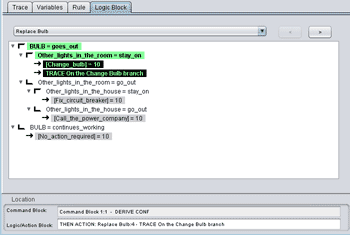 The Logic Block tab is the most powerful way to examine the status of a system as it is running. This tab displays the actual Logic Blocks in a system highlighted to indicate what nodes are True, False and Unknown.
Logic blocks can be selected from the drop down list or by clicking the "<" and ">" buttons to select the previous / next Logic Block in the system.
Nodes are marked with the same bracket and arrow icons as are used in the Logic Block development environment.
For a PDF with more details on the new features in Exsys Corvid v5.3, click here.
For more details on Exsys Corvid contact us today.